Meal planner with a grocery list
Plan the week’s dinners. Get one grocery list for all of them.
Kindly Fed is a family meal planner for iPhone and iPad. Tell it who’s eating and what you can spend, and in about two minutes it plans a week of dinners and writes the grocery list: every ingredient in one place, sorted by aisle and counted in the packages you actually buy.

Free to try: one full dinner and its shopping list every week.
- One list for the week
- Sorted by aisle
- Total before you shop
Updated
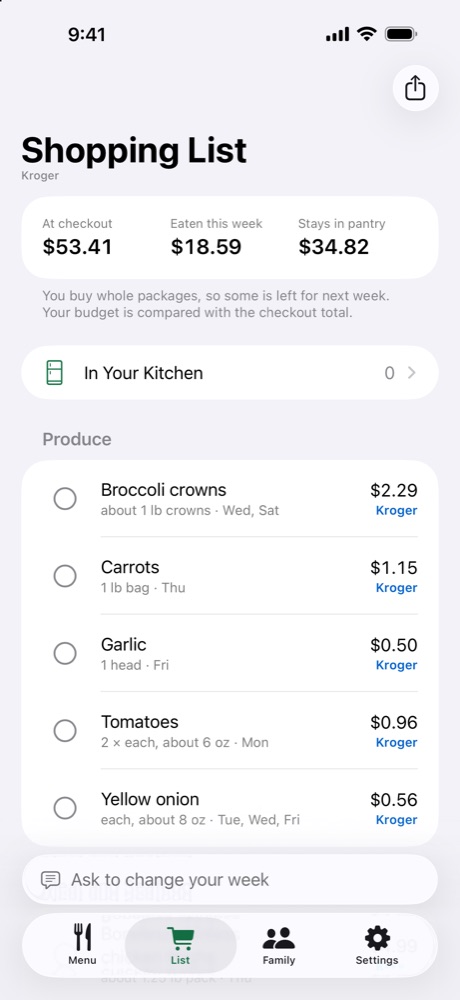
From menu to list, without copying a single ingredient
Plan the week
Add each person once, with their allergies, diet and the foods they won’t eat, and set a weekly budget. Kindly Fed plans the dinners, with a side when a meal needs one.
Add it all up
Every dinner’s ingredients go on one list. An onion used Tuesday, Wednesday and Friday is one line, with the days it’s for.
Round up to real packages
Recipe amounts become what goes in your cart, like a 1 lb bag of carrots or a head of garlic. The total counts whole packages.
Leave off what you have
Salt, oil and spices go in a separate Check Your Pantry list, outside the total. Food already in your kitchen is used first and left off the list.
Shop
Tap an item to check it off on your iPhone, iPad or Apple Watch, or share the list as text.
Free: the whole menu and its prices, plus one full dinner and its shopping list every week. The full list comes with a subscription or Lifetime.
What changes when the planner writes the list
| Kindly Fed | Copying from recipes by hand | |
|---|---|---|
| Same ingredient in several dinners | Added up into one line | Add it up yourself, or buy it twice |
| Amounts | Packages you can buy: a 1 lb bag, a 14.5 oz can | Recipe amounts: ½ cup, 2 tbsp |
| Order | Grouped by aisle | In recipe order |
| Cost | Checkout total before you shop | You find out at the register |
| Pantry staples | Listed apart, not in the total | Easy to rebuy what you already have |
More than a checklist
Real Kroger prices
In the US, pick a Kroger family store (Kroger, Ralphs, King Soopers, Fred Meyer, Harris Teeter and more) and the list uses its shelf prices and this week’s sales.
Your store’s prices
Swipe left on an item to enter what it costs where you shop. Kindly Fed remembers it.
Receipt scan
After you shop, scan the receipt. What you bought goes into your kitchen, and next week’s estimates use what you paid.
Shared with your family
Share the week through iCloud. Your menu, list and checked items stay in sync, with no account to create.
Apple Watch
Check items off from your wrist while you push the cart. Your iPhone follows along.
Breakfast and lunch too
Turn on breakfast or packed lunches, and their ingredients join the same list and the same total.
Questions
Can my partner and I share the same shopping list?
Yes. In the Family tab, share the week through iCloud. Everyone you invite sees the same menu and list, and items checked off on one phone are checked off on the others. There’s no account to sign up for; it all goes through your own iCloud.
Can I send the list to someone who doesn’t have the app?
Yes. The share button on the shopping list sends it as plain text, grouped by aisle with prices, to Messages, Mail, Notes or any app in the share sheet.
Are the prices on the list accurate?
At a Kroger family store in the US, the list uses that store’s shelf prices. Everything else is our estimate for your area, marked Est. Change any price and Kindly Fed remembers it; scan a receipt and it uses what you paid.
Is the shopping list free?
Every week you can plan the whole menu and see every price for free, plus one full dinner and its shopping list. The full list for every dinner comes with Kindly Fed Monthly ($1.99 a month) or Yearly ($14.99 a year), both with a 7-day free trial, or Lifetime ($29.99 once). One purchase covers your Family Sharing group.
More guides

Next week’s dinners, planned in two minutes.